# How to Migrate Off Klue, Crayon and Other CI Tools
> Thinking about switching your CI tool? The migration is easier than it looks: export over API or MCP in a day, rebuild the cards, move the team.
- Source: https://calven.ai/resources/competitive-intelligence/how-to-migrate-off-klue-or-crayon
- Author: David Kolinek
- Published: 2026-09-04
- Tags: competitive intelligence, Klue, Crayon, Kompyte, CI tools, battle cards, migration
---
Leaving a competitive intelligence tool is a smaller project than the renewal conversation makes it sound. The data comes out over an API or an MCP server in about a day, the next tool should take it as a bulk import, and most of what the old tool holds is public research any CI tool can redo. What takes real time is moving the people, and for many teams that is fewer people than they think. **Plan on a week for the data and a few weeks for the switch.**
If the stay-or-go call isn't made yet, [what Klue and Crayon cost at renewal](/resources/comparisons/klue-pricing) comes first. Still weighing the alternatives? [The best competitive intelligence tools](/resources/comparisons/best-competitive-intelligence-tools) compares them side by side. Leaving Klue specifically? The [Klue alternatives](/resources/comparisons/klue-alternatives) prices each option for a small team. This guide covers Klue, Crayon (crayon.co) and Kompyte, and the method works for any CI tool.
## Why is moving off a CI tool easier than it looks?
Competitive intelligence has become a commodity. Klue, Crayon, Kompyte and the newer AI tools all watch the same competitor websites, pricing pages, reviews and news, and all of them turn it into battle cards, digests and alerts. A team switching tools isn't moving something only the old vendor could have produced.
Most of what sits in the old tool can be created again. The next tool researches every competitor from scratch, and if it connects to the CRM and call transcripts, it pulls the field evidence straight from the source. What can't be recreated is what the team wrote itself: its own card edits, win stories, field notes and positioning calls. That is the part worth exporting. Even a team that cancels without migrating anything loses less than it fears.
## How do you get your data out without an export button?
None of the three tools has a button that exports everything from the UI. It doesn't matter much anymore. Klue and Crayon both run an MCP server and an API, so an AI agent such as Claude, Claude Code or Codex, connected with an admin key, can pull the cards and insights into files in an afternoon. The tool you move to then takes those files as an upload, which a modern CI tool should support. Ask about it before you buy.
### Klue
- **Content API:** returns every published card, including battlecards and win stories, as JSON. An admin creates the key under Apps & Integrations.
- **MCP server:** 24 tools, including card and battlecard extraction, over OAuth 2.0 or an API key. Win-loss transcripts are admin-only.
- **Gaps:** the battlecards endpoint returns layout, not content, so the agent reassembles each card from its parts. Dynamic cards are generated at view time and, per Glean's connector documentation, are not indexed; save those few by hand.
Calven's open-source [Klue export tool](https://github.com/calven-ai/calven-migrate-from-klue) runs the MCP server's card and battlecard extraction with your own Klue login and writes Markdown and JSON files to your machine. Nothing goes to Calven.
### Crayon (crayon.co)
- **Content and Answers APIs, and an MCP server:** carry the curated battlecard content.
- **Gaps:** per Glean's connector documentation, the Crayon API returns Sparks from the last 30 days only. Pull them before giving notice.
For Crayon, Calven's open-source [Crayon export tool](https://github.com/calven-ai/calven-migrate-from-crayon) asks the MCP server five questions about each competitor with your own Crayon login and saves every answer, with Crayon's citations, as Markdown and JSON on your machine. It exports Crayon's answers, not the raw cards, so check its `coverage.md` for gaps before you cancel.
### Kompyte
Kompyte belongs to Semrush, which Adobe acquired on April 28, 2026. It documents no public export route or API, so ask the account team what comes out and in what format.
## How long does a CI tool migration take?
About a week for the data. The rest depends on who uses the tool, and that is worth answering honestly before planning anything.
In many teams, the CI tool is one-way. The PMM or CI team collects insights in it and publishes the output: battle cards as documents or slides, a digest sent by email or chat, assets uploaded to the sales enablement platform. Sales consumes the output and never opens the tool. Here the change is small: the readers keep getting the same artifacts, only the source changes. Two weeks covers it.
If people work in the tool itself, through its app, browser extension or CRM widget, the switch also means training: telling them there is a new tool, why, and how to use it. Plan four to six weeks.
More and more, people don't open CI tools at all. They connect the tool's MCP server to their own Claude or ChatGPT and ask it questions there. For them, change management is close to zero: announce that one MCP server is being retired and another replaces it. Their interface, their own AI assistant, stays the same.
| When | What happens |
|---|---|
| Week 1 | **Get the data out**
Check the notice period in your contract. Export what your team wrote over the API or MCP and upload it to the new tool. |
| Weeks 2 to 3 | **Rebuild the battle cards**
Let the new tool research your competitors, compose the cards and review them. |
| Weeks 3 to 6 | **Move the people**
Tell everyone what changes and train whoever works in the tool. Then revoke the old integrations. |
The one fixed date is in the contract. Klue's terms want non-renewal notice 90 days before the term ends, Crayon's want it in writing 60 days before renewal, and Kompyte's by email before the last day of the term. Cancelling doesn't delete the data on day one either: Klue's terms give 90 days from the termination notice to extract it, and Kompyte's allow erasure no sooner than 30 days after termination. Read the order form, which can override the published terms, put the notice date in the calendar, and run the export before giving notice.
### How do you rebuild the battle cards?
Rebuild them. Don't port them. A team leaves a CI tool because of gaps, cost or cards nobody trusts, so the tool it picks next is likely better at composing them. Give it the chance before pasting the old ones in:
1. **Give the new tool your competitor list** and let it research each one from scratch.
2. **Connect the pipeline and call transcripts**, so the cards carry what buyers say in deals, next to what competitors publish. [Battle cards from sales calls](/resources/ai-for-pmm/battle-cards-from-sales-calls) covers which fields transcripts fill.
3. **Let it compose the battle cards**, starting with the three to five competitors sales meets most.
4. **Review them properly.** Read every card. Is it accurate, is it detailed enough, what's missing? Check them against the [battle card template](/resources/templates/battle-card-template) and [battle cards 101](/resources/competitive-intelligence/battle-cards-101). Often the new cards are better than the old ones, and the rebuild ends here.
5. **Optional: upload the old cards to close the gaps.** If something is still missing, upload the old cards as export files or PDFs and ask the tool to fold in what's still current. This assumes the new tool takes file uploads, which is standard for a modern CI tool.
That is how Calven works too: it does its own research, reads your call transcripts and interviews, and takes uploaded assets and a Klue or Crayon export on top. Nothing about it is rocket science.
## How do you get exec buy-in to switch CI tools?
Be honest with yourself first. Before anything goes to a VP, the numbers should convince you that the switch is worth it, and the answer can be no. Two slides cover it:
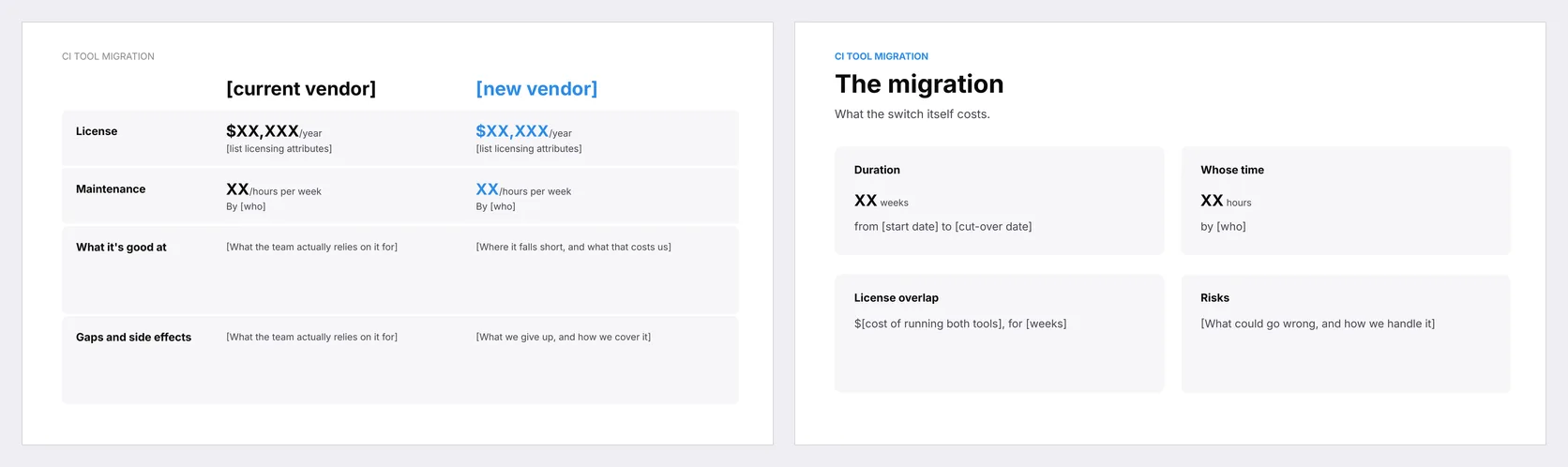
1. **Current against new.** The same four lines for each: the license, the weekly hours spent maintaining it, what the team actually relies on it for, and its gaps and side effects. The new side can be another tool, a build of your own, or no CI tool at all. Maintenance never goes to zero, so estimate it there too.
2. **The migration.** A one-off: how many weeks, whose time, any overlap in licenses, and what could go wrong.
The strengths and gaps don't convert to dollars, and they don't need to. Written down side by side, the switch either pays for itself or it doesn't, and the VP sees the same numbers you do. Klue's prices live in the [Klue pricing](/resources/comparisons/klue-pricing) breakdown.
## Switching from any CI tool: what goes on the checklist?
**Before you decide**
1. Find the notice deadline in your contract (Klue 90 days, Crayon 60 days in writing, Kompyte by email before the last day of the term).
2. Decide what replaces the tool: buy another one, build your own, or stop doing CI. Stopping is a valid answer. "We'll figure it out" isn't.
3. List everyone the change touches: who uses the tool today, for what, and through which interface (the app, a browser extension, the CRM, chat, an MCP server).
4. Fill in the two slides: current against new, and the migration.
5. If you're buying, tell the new vendor early which tool you're leaving and ask what migration support it offers.
**Week 1: data**
6. Export cards, competitor profiles, win stories and intel over the API or MCP. For Klue cards and battlecards, the open-source [Klue export tool](https://github.com/calven-ai/calven-migrate-from-klue) does it in one command; for Crayon, the [Crayon export tool](https://github.com/calven-ai/calven-migrate-from-crayon) saves its MCP answers with citations.
7. Screenshot what no export covers: tracked competitors, sources, alert rules, digest audiences.
8. Import the export into the new tool and store a copy outside both.
**Weeks 2 to 3: rebuild**
9. Let the new tool research your competitors and connect it to the CRM and call transcripts.
10. Have it compose cards for the top three to five competitors, and review every one.
11. Upload the old cards only to close the gaps you found.
**Switch over**
12. Tell everyone what changes. For AI assistant users, swap the old MCP server for the new one.
13. Train whoever worked in the old tool directly.
14. Give notice, revoke OAuth grants and API keys, and remove bots and browser extensions.
**Free template:** [CI Tool Migration Checklist and Exec Slides](https://docs.google.com/presentation/d/1heQiOpjpsui9RtO4lv9iXOeNKIn2uUGr1JALxmxg9-0)
The migration checklist on one slide, plus two slides for the exec decision: current vendor against new, and the one-off cost of the migration.
The [CI tool migration checklist](/resources/templates/how-to-migrate-off-klue-or-crayon-template) also has its own page in Templates.
## What does a modern CI tool look like?
If you're leaving Klue or Crayon, try a tool built the way this guide describes. [Calven's Competitive Intelligence Agent](/platform/research#competitive-intelligence) maps your competitors from a company name and URL, researches each one into a dossier, and composes a sourced battle card per competitor. It watches competitor websites and docs and folds what changes back into the dossier. The owner approves each change, or lets routine updates publish on their own.
Your team doesn't have to learn another app to use it. Reps and PMMs reach the same intelligence from their own Claude or ChatGPT through [Calven's MCP server](/mcp), so the switch is one connector, not a training program. Competitive intelligence is one agent among several: the [AI product marketing platform](/resources/ai-for-pmm/ai-product-marketing-platform) also covers positioning and messaging, win-loss and customer research. For the side-by-side first, see [how Calven compares to Klue](/resources/comparisons/calven-vs-klue).
[Start a Calven trial](https://app.calven.ai/sign-up) while the old tool is still live, give it your competitor list, and compare its battle cards with the ones you have before the notice date.